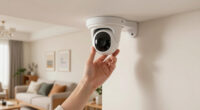
For most households, I’d put the Tapo 2K Pan Tilt Security Camera 2-Pack first: two cameras and pan-tilt coverage can help family members check more than one room without buying separate models. The eufy Security 4K Indoor Camera E30 is a standout for shoppers who prioritize detailed video and no required subscription, while the Kasa EC71 offers a simpler 1080p pan-tilt option with two-way audio. Choosing among indoor cameras for elderly care means balancing room coverage, clear alerts, privacy, setup, and ongoing fees; a camera is a check-in tool, not a replacement for hands-on care or emergency response. Read on for the full breakdown, including which picks suit different homes and monitoring needs.

Get decor and gifts delivered free with Prime
- Fast, free delivery on millions of items
- Prime Video, Amazon Music and more included
- Member-only deals all year
Complete the kit


Key Takeaways
- Two-camera coverage is the main advantage of the Tapo 2K Pan Tilt 2-Pack: it can cover separate rooms with one purchase, while single-camera picks suit focused monitoring.
- Image detail and ownership costs point in different directions: the eufy E30 emphasizes 4K video and no required subscription, while the lineup also includes basic 1080p wired models.
- Pan-tilt cameras are better for checking a room than fixed-view models: they can redirect the view remotely, but still cannot see through walls or guarantee a person is safe.
- Large kits are not automatically the best value for every home: Anona’s 2- and 4-camera 4K packs and GNCC’s four-camera set suit multi-room coverage, but require more installation and notification management.
- There is no single best fit for every family: Blink Mini models, Ring Indoor Cam, Tapo C100, and compact wireless options each make different tradeoffs in resolution, coverage, and setup.
| Aosu 2K Indoor Camera Baby Monitor for Home Security with 2.4GHz WiFi | 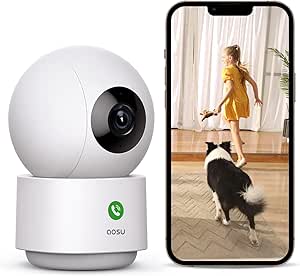 | Best for Flexible Room Coverage | Resolution: 3 MP | Night vision range: 33 feet | Pan and tilt: 360° rotation with vertical tilt | VIEW ON AMAZON | See Our Full Breakdown |
| Tapo 2K Pan Tilt Security Camera for Baby Monitor, Dog Camera (2-Pack) | 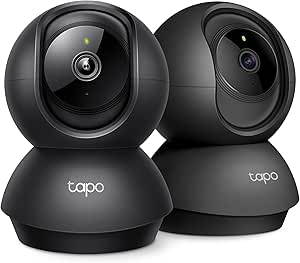 | Best Two-Room Monitoring Set | Quantity: 2 cameras | Video resolution: 2K HD, 3 MP (2048 × 1536) | Field of view: 360° horizontal, 114° vertical | VIEW ON AMAZON | See Our Full Breakdown |
| Kasa Smart Pan/Tilt Indoor Security Camera (EC71), 1080p HD, Baby & Pet Monitor with 2-Way Audio | 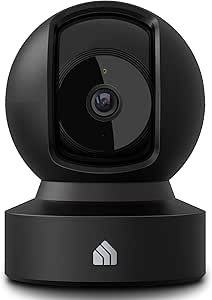 | Best for Motion and Sound Alerts | Resolution: 1080p Full HD | Pan and tilt: 360° horizontal, 113° vertical | Night vision: Up to 30 feet | VIEW ON AMAZON | See Our Full Breakdown |
| Tapo 1080p Pan/Tilt Security Camera for Baby Monitor, Pet Camera, C201 |  | Best Straightforward 1080p Pick | Resolution: 1080p Full HD | Pan and tilt: 360° horizontal, 114° vertical | Night vision: Up to 30 feet | VIEW ON AMAZON | See Our Full Breakdown |
| eufy Security 4K Indoor Camera E30, No Subscription, Work as Pet Camera |  | Best Premium Detail and Local Recording | Resolution: 4K UHD, 8 MP | Frame rate: 25 fps | Field of view: 360° | VIEW ON AMAZON | See Our Full Breakdown |
| Blink Mini Pan-Tilt Camera (White) |  | Best for Alexa Households | Video quality: HD | Coverage: 360° pan-tilt | Night vision: Infrared | VIEW ON AMAZON | See Our Full Breakdown |
| Anona 4K UHD Indoor Security Camera (4 Pack) |  | Best for Multi-Room Coverage | Resolution: 4K UHD (8 MP) | Digital zoom: 8x | Pan and tilt: 360° pan, 110° tilt | VIEW ON AMAZON | See Our Full Breakdown |
| Anona 4K UHD Indoor Security Camera (2 Pack) |  | Best Two-Room 4K Set | Resolution: 4K UHD (8 MP) | Digital zoom: 8x | Pan and tilt: 360° pan, 110° tilt | VIEW ON AMAZON | See Our Full Breakdown |
| Tapo 2K+ Indoor/Outdoor Wired Security Camera, Baby Monitoring, C120 |  | Best for Flexible Indoor and Outdoor Use | Resolution: 4 MP (2K+) | Field of view: 120° diagonal, 103° horizontal, 55° vertical | Night vision: 850 nm and 940 nm IR, up to 30 ft; full-color night vision | VIEW ON AMAZON | See Our Full Breakdown |
| Tapo 1080P Indoor Security Camera, Baby Monitor, Dog Camera, Wired, C100 |  | Best Simple Fixed-View Pick | Resolution: 1080p | Night vision range: Up to 30 feet | Storage: MicroSD up to 512 GB; cloud options | VIEW ON AMAZON | See Our Full Breakdown |
| GNCC 5G Cameras for Home Security Indoor, Pet/Dog/Baby w Phone App, 4Pcs | 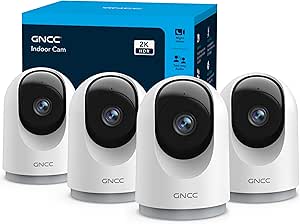 | Best Multi-Room Coverage | Video resolution: 2K; listed still resolution is 3 MP | Camera count: 4 | Pan and tilt: 355° horizontal and 90° vertical | VIEW ON AMAZON | See Our Full Breakdown |
| Blink Mini 2K+ Indoor Security Camera (Newest Model) |  | Best Compact 2K Camera | Video resolution: 2K (2560 × 1440) | Field of view: 138° diagonal | Frame rate: Up to 24/25 FPS | VIEW ON AMAZON | See Our Full Breakdown |
| Ring Indoor Cam (Newest Model) – Home or Business Security in 1080p HD Video, White |  | Best for Ring and Alexa Households | Video: 1080p HD live video | Field of view: 143° diagonal; 115° horizontal; 59° vertical | Night vision: Color night vision | VIEW ON AMAZON | See Our Full Breakdown |
| Funstorm 2025 Upgraded Security Camera, 4K HD Mini Nanny Cam for Home with Night Vision, WiFi Indoor Camera, 100 Days Long Battery Life, Motion Detection, Remote Viewing, Wireless Surveillance Cam | 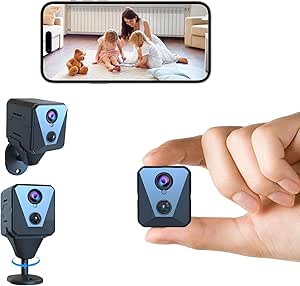 | Best for Flexible, Cord-Free Placement | Video resolution: Listing claims 4K; specifications list 1080p video capture | Still resolution: 4000 pixels, as listed | Field of view: 110° in description; 150° in product information | VIEW ON AMAZON | See Our Full Breakdown |
| indoor cameras for elderly | Connectivity | Audio | Storage | Resolution |
|---|---|---|---|---|
| Aosu 2K Indoor Camera Baby Mon | 2.4GHz Wi-Fi | Two-way audio | — | 3 MP |
| Tapo 2K Pan Tilt Security Came | 2.4GHz Wi-Fi | Two-way audio | MicroSD up to 512 GB (card not included) or Tapo Care cloud | — |
| Kasa Smart Pan/Tilt Indoor Sec | 2.4GHz Wi-Fi | Two-way audio | MicroSD up to 256 GB (not included) or Kasa Care cloud | 1080p Full HD |
| Tapo 1080p Pan/Tilt Security C | 2.4GHz Wi-Fi | — | MicroSD up to 512 GB or Tapo Care cloud | 1080p Full HD |
| eufy Security 4K Indoor Camera | — | Two-way audio | Local SD card (sold separately); optional cloud storage | 4K UHD, 8 MP |
| Blink Mini Pan-Tilt Camera | Wi-Fi | Two-way | — | — |
| Anona 4K UHD Indoor Security C | — | Two-way | MicroSD up to 512 GB or cloud storage | 4K UHD (8 MP) |
| Anona 4K UHD Indoor Security C | — | Two-way | MicroSD up to 512 GB or cloud storage | 4K UHD (8 MP) |
| Tapo 2K+ Indoor/Outdoor Wired | Wi-Fi 802.11b/g/n | — | MicroSD up to 512 GB or cloud | 4 MP (2K+) |
| Tapo 1080P Indoor Security Cam | Wi-Fi | — | MicroSD up to 512 GB; cloud options | 1080p |
| GNCC 5G Cameras for Home Secur | — | Two-way audio | microSD card (not included) or optional cloud storage | — |
| Blink Mini 2K+ Indoor Security | 2.4 GHz Wi-Fi 802.11 b/g/n | Two-way talk with enhanced audio clarity | — | — |
| Ring Indoor Cam | 2.4 GHz Wi-Fi 802.11 b/g/n | Two-way audio with noise cancellation | — | — |
| Funstorm 2025 Upgraded Securit | Wi-Fi; wireless | — | — | — |
More Details on Our Top Picks
Aosu 2K Indoor Camera Baby Monitor for Home Security with 2.4GHz WiFi
For keeping an eye on an older relative in a shared room, the Aosu pairs 2K video with 360° rotation and motion tracking, so activity can stay in view without relying on a fixed camera angle. Its two-way audio also gives caregivers a way to check in remotely. Compared with the 1080p Tapo C201, the Aosu offers higher stated resolution, while the Tapo lists a larger supported microSD capacity. Voice-assistant support may suit homes already using Alexa or Google Assistant, but the listing does not describe senior-specific alerts or fall detection, so this is a general monitoring camera rather than a medical safety device. It needs continuous wired power and only connects to 2.4GHz Wi-Fi; setup may also take more effort than a simpler fixed-view option.
Pros:- 2K, 3 MP video provides more image detail than the 1080p Tapo C201.
- 360° horizontal rotation and vertical tilt let caregivers adjust the room view remotely.
- Motion tracking can follow movement rather than leaving activity outside a fixed frame.
- Two-way audio and Alexa and Google Assistant compatibility support remote check-ins.
Cons:- Requires continuous corded power, which limits placement and may leave a cable within reach.
- Supports 2.4GHz Wi-Fi only, so it will not connect directly to a 5GHz-only network.
- No fall detection or dedicated emergency alert function is listed.
Best for: Caregivers who want a remotely adjustable view and two-way check-ins in a room with reliable 2.4GHz Wi-Fi and a nearby outlet.
Not ideal for: Households seeking fall detection, a dedicated emergency call feature, wireless placement, or compatibility with a 5GHz-only network.
- Resolution:3 MP
- Night vision range:33 feet
- Pan and tilt:360° rotation with vertical tilt
- Connectivity:2.4GHz Wi-Fi
- Audio:Two-way audio
- Storage capacity:Up to 128 GB
- Power:Corded electric, 5V
- Smart home control:App, Alexa, Google Assistant
Our verdict“Choose the Aosu for adjustable 2K room monitoring and two-way check-ins, but not as a substitute for a fall-alert system.”
Tapo 2K Pan Tilt Security Camera for Baby Monitor, Dog Camera (2-Pack)
This two-camera package makes the most sense when a caregiver needs to check two separate rooms, such as a bedroom and a common area, without moving one camera between them. Each camera offers 2K video, pan and tilt, and two-way audio; person detection can help distinguish a person from general motion. Compared with the single Aosu camera, the included second unit gives broader household coverage, while the Aosu lists a 33-foot night-vision range and this Tapo listing does not specify one. Local recording supports a microSD card up to 512 GB, but the card is not included, and some features may require Tapo Care. Remote access depends on Wi-Fi, and these cameras do not provide listed fall detection or an emergency call function, so they support observation rather than clinical monitoring.
Pros:- Two cameras can cover separate rooms at the same time.
- 2K, 3 MP video and pan-and-tilt coverage support detailed remote viewing.
- Person detection and two-way audio can make check-ins more useful than motion alerts alone.
- Supports local microSD storage up to 512 GB as well as optional cloud storage.
Cons:- MicroSD cards are not included, adding a separate setup step for local recording.
- Some features may require a Tapo Care subscription.
- No fall detection or dedicated emergency call feature is listed.
Best for: Families who want simultaneous camera coverage in an older adult’s bedroom and another frequently used room.
Not ideal for: Buyers who need a single simple camera, do not have dependable Wi-Fi, or require fall detection and emergency-response features.
- Quantity:2 cameras
- Video resolution:2K HD, 3 MP (2048 × 1536)
- Field of view:360° horizontal, 114° vertical
- Connectivity:2.4GHz Wi-Fi
- Storage:MicroSD up to 512 GB (card not included) or Tapo Care cloud
- Audio:Two-way audio
- Alarm:Built-in siren and light alarm
- Compatibility:Alexa, Google Assistant, RTSP/ONVIF
Our verdict“Pick this two-pack when room-to-room coverage matters more than a single-camera setup or senior-specific safety alerts.”
Kasa Smart Pan/Tilt Indoor Security Camera (EC71), 1080p HD, Baby & Pet Monitor with 2-Way Audio
The Kasa EC71 stands out for its motion tracking and baby-crying detection, which may help caregivers notice activity or sound while they are elsewhere in the home. Those alerts are not the same as fall detection, and the product data does not claim a senior-specific monitoring feature. Its 360° pan and tilt provide broad room coverage, though video is 1080p rather than the 2K detail offered by the Aosu and Tapo C211. Night vision reaches up to 30 feet, and footage can be stored on a separate microSD card or through Kasa Care cloud storage. Alexa and Google Home support can fit an existing smart-home setup. The tradeoff is a 2.4GHz-only connection and extra setup or subscription needs for recording, making it less appealing for caregivers who want a straightforward, self-contained alert system.
Pros:- Baby-crying and motion detection provide sound and movement alerts.
- 360° horizontal and 113° vertical movement helps cover a room from one placement.
- Motion tracking can keep moving activity in frame.
- Works with Alexa and Google Home and supports local microSD storage.
Cons:- 1080p resolution provides less detail than the 2K Aosu and Tapo C211.
- MicroSD card is not included, and extended cloud history requires a Kasa Care subscription.
- Only supports 2.4GHz Wi-Fi and does not list fall detection.
Best for: Caregivers who want motion tracking and sound-based alerts in a room, and are comfortable setting up storage and app notifications.
Not ideal for: Anyone who needs fall detection, higher-than-1080p video, 5GHz Wi-Fi support, or recording without adding a card or cloud plan.
- Resolution:1080p Full HD
- Pan and tilt:360° horizontal, 113° vertical
- Night vision:Up to 30 feet
- Connectivity:2.4GHz Wi-Fi
- Detection:Motion tracking and baby-crying detection
- Audio:Two-way audio
- Storage:MicroSD up to 256 GB (not included) or Kasa Care cloud
- Smart home integration:Alexa, Google Home
Our verdict“Choose the Kasa EC71 for sound and motion alerts on a budget-friendly 1080p setup, not for fall monitoring or maximum image detail.”
Tapo 1080p Pan/Tilt Security Camera for Baby Monitor, Pet Camera, C201
The Tapo C201 suits caregivers who want a broad room view without paying for resolution they may not need on a phone screen. Its 360° horizontal and 114° vertical pan and tilt can cover more of a room than a fixed camera, and the listing includes motion and baby-crying alerts plus night vision up to 30 feet. Compared with the Kasa EC71, it supports microSD cards up to 512 GB rather than 256 GB; the Kasa, by contrast, explicitly lists motion tracking. Both are 1080p and rely on 2.4GHz Wi-Fi, so neither is the best fit for a 5GHz-only network or a need for detailed zoomed-in footage. Local storage requires a separate card, remote viewing needs Wi-Fi, and the listed features do not include fall detection or an emergency call button.
Pros:- Wide pan-and-tilt movement can cover a room from one camera position.
- Motion and baby-crying alerts can notify caregivers of activity or sound.
- Supports local microSD storage up to 512 GB and optional Tapo Care cloud storage.
- Alexa and Google Assistant compatibility can fit an existing smart-home setup.
Cons:- 1080p video offers less detail than the 2K Aosu and Tapo C211.
- MicroSD card is not included, and cloud features may involve a subscription.
- Night vision is listed at up to 30 feet, and no fall detection is specified.
Best for: Caregivers who want a simple pan-and-tilt camera with motion and sound alerts for a Wi-Fi-connected room.
Not ideal for: Buyers who need 2K or 4K detail, explicit motion tracking, fall detection, or a camera that works without Wi-Fi.
- Resolution:1080p Full HD
- Pan and tilt:360° horizontal, 114° vertical
- Night vision:Up to 30 feet
- Connectivity:2.4GHz Wi-Fi
- Storage:MicroSD up to 512 GB or Tapo Care cloud
- Alerts:Motion and baby-crying alerts
- Smart home compatibility:Amazon Alexa, Google Assistant
Our verdict“Choose the C201 for basic room-wide viewing and alerts, but step up to a 2K model if image detail is a priority.”
eufy Security 4K Indoor Camera E30, No Subscription, Work as Pet Camera
The Eufy E30 is the lineup’s strongest fit for caregivers who want 4K detail, 24/7 recording, and local storage without a required monthly fee. Its AI detection can identify people, pets, audio cues, and crying sounds, while auto-tracking and a 360° view help keep movement visible. Compared with the 2K Tapo C211, the E30 offers higher stated resolution and lists on-device AI; the Tapo two-pack, however, covers two rooms with two cameras. A built-in spotlight supports color night vision, and two-way audio enables remote conversation. The main tradeoffs are a separate SD card for local storage and a wired connection. HomeKit video is limited to 1080p, so Apple Home users will not receive the full 4K resolution through that integration. No fall detection is listed.
Pros:- 4K recording captures more detail than the 2K Aosu and Tapo C211.
- On-device AI detection covers people, pets, audio cues, and crying sounds.
- 360° pan and tilt, auto-tracking, and two-way audio support remote observation and conversation.
- Local SD-card recording is available without a required subscription; spotlight-assisted color night vision is included.
Cons:- SD card is sold separately, and optional cloud storage or premium features may require a subscription.
- HomeKit supports up to 1080p rather than the camera’s full 4K resolution.
- Wired power limits placement, and no fall detection is specified.
Best for: Caregivers who prioritize detailed video, continuous recording, and local storage across one room, especially in an Alexa, Google, or HomeKit home.
Not ideal for: Households needing two-room coverage from one purchase, battery-powered placement, or fall detection and emergency response features.
- Resolution:4K UHD, 8 MP
- Frame rate:25 fps
- Field of view:360°
- Recording:24/7 recording
- Detection:On-device AI for humans, pets, audio cues, and crying sounds
- Night vision:Infrared and color night vision with built-in spotlight
- Audio:Two-way audio
- Storage:Local SD card (sold separately); optional cloud storage
- Compatibility:HomeKit, Alexa, Google Assistant; HomeKit up to 1080p
Our verdict“Pick the E30 for high-detail, subscription-optional monitoring in one room, provided you do not need fall alerts or multiple-camera coverage.”
Blink Mini Pan-Tilt Camera (White)
For checking on someone from another room, the Blink Mini Pan-Tilt’s remote 360° movement is more flexible than the fixed-view Tapo C100: you can adjust the camera’s view in the app instead of accepting one angle. Two-way audio also allows a quick conversation without needing to call across the house, while infrared night vision supports monitoring after dark. Alexa integration is a practical plus for households that already use Echo devices for voice control or viewing.
The tradeoff is that storage and longer live viewing are less straightforward: cloud recording requires a subscription, local storage needs a Sync Module 2 and USB drive, and continuous live streaming is limited to 90 minutes and requires a subscription. Choose the C100 instead if a stationary view and simpler local-storage setup matter more than camera movement.
Pros:- Remote pan and tilt provide broader room coverage than a fixed camera.
- Two-way audio supports quick check-ins from a phone.
- Infrared night vision helps monitor a dim room.
- Works with Alexa devices for voice control and Echo Show viewing.
Cons:- Cloud storage requires a paid subscription.
- Local recording requires a separate Sync Module 2 and USB drive.
- Continuous live streaming is limited to 90 minutes and requires a subscription.
Best for: Older adults’ families who already use Alexa and want to reposition the camera remotely to check different parts of a room.
Not ideal for: Buyers who want included local recording hardware or extended live viewing without subscription requirements.
- Video quality:HD
- Coverage:360° pan-tilt
- Night vision:Infrared
- Audio:Two-way
- Connectivity:Wi-Fi
- Compatibility:Alexa
- Included items:Camera, pan-tilt mount, USB cable, power adapter
Our verdict“Pick the Blink Mini Pan-Tilt if Alexa compatibility and a remotely adjustable view matter more than simple, subscription-free recording.”
Anona 4K UHD Indoor Security Camera (4 Pack)
This four-camera Anona set is the clearest fit for families who want to monitor several rooms, rather than relying on one camera to cover a whole home. 4K resolution and 8x digital zoom provide more image detail than the Tapo C120’s 2K+ video, while person, pet, and crying detection can make alerts more relevant to checking on an older adult. Pan, tilt, and auto-tracking add flexibility when movement happens within a room.
That wider coverage comes with setup demands: the cameras require a Wi-Fi 6-compatible network, the microSD cards are not included, and buyers may need time to configure multiple devices and detection settings. The two-camera Anona pack offers similar listed camera features with fewer units, so it may suit a smaller home better. Video runs at 15 fps, a tradeoff for buyers who prioritize detailed footage over smoother motion.
Pros:- Four cameras make it easier to cover multiple rooms.
- 4K video and 8x digital zoom provide detailed views.
- AI detection includes people, pets, and crying.
- Supports microSD storage up to 512 GB or cloud storage.
Cons:- Requires a Wi-Fi 6-compatible network.
- MicroSD cards are not included.
- The 15 fps frame rate and multi-camera setup may not suit every household.
Best for: Families monitoring an older adult across several rooms who have Wi-Fi 6 and are comfortable configuring multiple app-connected cameras.
Not ideal for: Households with older Wi-Fi equipment, limited patience for setup, or a need for included local-storage cards.
- Resolution:4K UHD (8 MP)
- Digital zoom:8x
- Pan and tilt:360° pan, 110° tilt
- Wi-Fi:Dual-band Wi-Fi 6 (2.4 GHz/5 GHz)
- Storage:MicroSD up to 512 GB or cloud storage
- Frame rate:15 fps
- Audio:Two-way
- Detection:AI person, pet, and crying detection
Our verdict“Choose this four-pack when several rooms need coverage and your household can handle Wi-Fi 6 setup and separate storage cards.”
Anona 4K UHD Indoor Security Camera (2 Pack)
The two-camera Anona set suits families who want a high-detail view in a pair of important rooms without taking on the four units in its larger pack. Both cameras offer 4K video, 8x zoom, pan-tilt movement, and auto-tracking, giving a caregiver options for a bedroom and living area, for example. Compared with the fixed-view Tapo C100, this set can follow activity across a broader area and offers more detail for zooming in on the image.
Its person, pet, and crying detection may help direct attention to relevant events, but it does not replace direct contact or emergency monitoring. The tradeoffs are the same setup and network demands as the four-pack: Wi-Fi 6 is required, the microSD cards are separate purchases, and setup may feel involved. At 15 fps, it also favors resolution over smoother movement.
Pros:- Two cameras can cover separate rooms with one set.
- 4K resolution and 8x zoom support detailed viewing.
- Pan-tilt movement and auto-tracking broaden room coverage.
- AI alerts include person, pet, and crying detection.
Cons:- Requires a Wi-Fi 6-compatible network for connectivity.
- MicroSD cards are not included.
- Setup complexity and 15 fps video may frustrate buyers seeking a basic camera.
Best for: Caregivers who want to monitor two rooms with adjustable 4K cameras and have a Wi-Fi 6 network.
Not ideal for: Buyers who only need one simple fixed camera, lack Wi-Fi 6, or want storage cards included.
- Resolution:4K UHD (8 MP)
- Digital zoom:8x
- Pan and tilt:360° pan, 110° tilt
- Wi-Fi:Dual-band Wi-Fi 6 (2.4 GHz/5 GHz)
- Storage:MicroSD up to 512 GB or cloud storage
- Frame rate:15 fps
- Audio:Two-way
- Detection:AI person, pet, and crying detection
Our verdict“Choose the two-pack for detailed, adjustable coverage in two rooms, but skip it if your network or storage setup is not ready.”
Tapo 2K+ Indoor/Outdoor Wired Security Camera, Baby Monitoring, C120
The Tapo C120 makes sense when a family wants one camera that can move between indoor monitoring and a sheltered outdoor location. Its weatherproof design is a meaningful distinction from indoor-only options such as the Tapo C100, while 2K+ video, AI detection, and two-way audio with noise cancellation support everyday check-ins. Full-color night vision is another useful choice when color detail at night matters more than an infrared-only view.
Unlike the Anona cameras, the C120 has a fixed 120° diagonal field of view rather than remote pan and tilt, so placement matters more and it cannot follow someone around the room. Local microSD storage is supported up to 512 GB, but the card is not included, and some features may require cloud service. Its broad detection options may also take more configuration than a family wants for a simple check-in camera.
Pros:- Weatherproof design allows indoor or outdoor placement.
- 2K+ resolution offers more detail than 1080p cameras such as the Tapo C100.
- Two-way audio includes noise cancellation.
- Offers infrared and full-color night vision options.
Cons:- Fixed field of view cannot be repositioned remotely like the Anona pan-tilt cameras.
- MicroSD card is not included, and some features may require cloud service.
- The range of features may take time to configure.
Best for: Families who need a wired camera for an older adult’s room that may also be used in a weather-exposed location.
Not ideal for: Caregivers who need remote pan-tilt movement to follow activity across a room or want a very simple setup.
- Resolution:4 MP (2K+)
- Field of view:120° diagonal, 103° horizontal, 55° vertical
- Night vision:850 nm and 940 nm IR, up to 30 ft; full-color night vision
- Frame rate:20 fps
- Digital zoom:12x
- Storage:MicroSD up to 512 GB or cloud
- Connectivity:Wi-Fi 802.11b/g/n
- Power:5V, 1A adapter
Our verdict“Choose the C120 if weatherproof flexibility and two-way audio matter more than remote camera movement.”
Tapo 1080P Indoor Security Camera, Baby Monitor, Dog Camera, Wired, C100
The Tapo C100 is the straightforward choice for a caregiver who wants a basic view of one room rather than the adjustable coverage of the Blink Mini Pan-Tilt or Anona cameras. 1080p video, night vision up to 30 feet, and two-way audio cover the core needs for seeing and speaking with someone from a phone. It also supports microSD storage up to 512 GB, giving buyers a local-recording route instead of relying only on cloud service.
That simplicity comes with limits: the camera is fixed rather than pan-tilt, so its view depends on where it is mounted, and the microSD card is not included. The listing also describes it as indoor use while specifying IP65 water resistance, which is not a central benefit for most bedroom or living-room setups. Choose the C120 instead if you need 2K+ detail or outdoor flexibility.
Pros:- 1080p video and night vision up to 30 feet cover basic room monitoring.
- Two-way audio supports remote conversation.
- Supports microSD storage up to 512 GB and cloud options.
- Compatible with Alexa and Google Assistant.
Cons:- Fixed viewing angle cannot follow movement around the room.
- MicroSD card is not included.
- Offers less video detail than the Tapo C120 and Anona 4K models.
Best for: Caregivers who want an uncomplicated, fixed camera for one room with two-way audio and the option of local microSD recording.
Not ideal for: Families who need remote pan-tilt coverage, higher-resolution footage, or a camera that can track movement around a room.
- Resolution:1080p
- Night vision range:Up to 30 feet
- Storage:MicroSD up to 512 GB; cloud options
- Connectivity:Wi-Fi
- Mount type:Wall mount
- Weight:270 g
- Water resistance:IP65
- Color:White
Our verdict“Pick the C100 for simple single-room monitoring, but choose a pan-tilt model if the camera needs to follow activity.”
GNCC 5G Cameras for Home Security Indoor, Pet/Dog/Baby w Phone App, 4Pcs
For families checking on an older adult across several rooms, this four-camera kit offers broader coverage than a single-camera option such as the Ring Indoor Cam. Each camera can pan and tilt through a stated 355° horizontal and 90° vertical range, which helps one unit cover more of a room than a fixed-view camera. Two-way audio also lets a caregiver speak through the app, though it is not a dedicated emergency-response or medical alert system.
The tradeoff is setup and storage: all four units need power, microSD cards are not included, and cloud storage is optional. The listing describes Wi-Fi support but does not establish that these cameras can use a 5 GHz network, so check router compatibility before buying. I’d choose this kit for multiple-room monitoring, not for someone seeking the simplest single-camera setup.
Pros:- Four cameras can cover multiple rooms from one kit.
- Pan-and-tilt movement broadens each camera’s viewing area.
- Two-way audio supports remote check-ins through the app.
- Supports continuous recording to a separately purchased microSD card.
Cons:- Four corded cameras require multiple power outlets and more setup.
- MicroSD cards are not included, and cloud storage is optional.
- The listing does not clearly confirm 5 GHz Wi-Fi compatibility despite the product title.
Best for: Families who want app-based live views and two-way audio in several rooms of an older adult’s home.
Not ideal for: Caregivers who need a simple one-camera setup, built-in emergency calling, or included local recording storage.
- Video resolution:2K; listed still resolution is 3 MP
- Camera count:4
- Pan and tilt:355° horizontal and 90° vertical
- Audio:Two-way audio
- Night vision:Supported
- Storage:microSD card (not included) or optional cloud storage
- Power:Corded electric, 5 V
- Smart home compatibility:Amazon Alexa and Google Assistant
Our verdict“Choose this kit if you need app-based coverage and two-way conversation in several rooms and can manage the extra setup and storage.”
Blink Mini 2K+ Indoor Security Camera (Newest Model)
The Blink Mini 2K+ is a small, straightforward choice for a caregiver who wants a clear view of one room without installing a larger moving camera. Its 2K video and enhanced audio can make it easier to see and hear activity than the 1080p Ring Indoor Cam, while its compact body is suited to a shelf or tabletop near a frequently used area. Two-way talk provides a way to check in, but this remains a camera rather than a dedicated care-call device.
Unlike the pan-and-tilt GNCC four-camera kit, the Mini 2K+ has a fixed 138° diagonal view, so placement matters more if the person moves around the room. Smart detection and cloud storage require a subscription, which adds an ongoing service dependency. I’d pick it for a focused, compact view, not whole-home coverage.
Pros:- 2K video captures more detail than the 1080p Ring Indoor Cam.
- Compact 2 × 2 × 1.57-inch body fits discreetly on a shelf.
- Two-way talk and enhanced audio support remote check-ins.
- Includes a mounting kit and stand for flexible placement.
Cons:- Fixed 138° diagonal view cannot pan to follow movement.
- Smart detection and cloud storage require a subscription.
- Outdoor use needs additional weather-resistant accessories.
Best for: Caregivers who want a compact, plug-in camera with detailed video for one main room and already use Alexa.
Not ideal for: People who need pan-and-tilt tracking, multi-room coverage, or detection and cloud features without a subscription.
- Video resolution:2K (2560 × 1440)
- Field of view:138° diagonal
- Frame rate:Up to 24/25 FPS
- Audio:Two-way talk with enhanced audio clarity
- Connectivity:2.4 GHz Wi-Fi 802.11 b/g/n
- Dimensions:2 × 2 × 1.57 inches
- Weight:65 g
- Cloud storage:Up to 60 days with subscription
Our verdict“Pick the Mini 2K+ for a compact, detailed view of one room, but choose a pan-and-tilt model if the person moves beyond its fixed frame.”
Ring Indoor Cam (Newest Model) – Home or Business Security in 1080p HD Video, White
For a caregiver who already manages devices through Ring or Alexa, the Ring Indoor Cam offers a familiar indoor monitoring setup with 1080p live video, motion zones, and two-way audio. Its included privacy cover is a useful physical control when monitoring is not wanted, while color night vision can help maintain a usable view in dim rooms. Compared with the sharper Blink Mini 2K+, Ring’s appeal is less about resolution and more about fitting into an existing Ring setup.
The camera has a fixed view, so it cannot follow someone moving through a room like the pan-and-tilt GNCC cameras. It also connects on 2.4 GHz Wi-Fi and relies on a Ring subscription for full features and video storage. I’d favor it for a straightforward, privacy-conscious single-room view, but not for caregivers who need broad moving coverage or local storage.
Pros:- Privacy cover provides a physical way to block the camera when needed.
- Color night vision supports viewing in dim indoor settings.
- Two-way audio with noise cancellation enables remote conversation.
- Customizable motion zones help focus alerts on selected areas.
Cons:- 1080p resolution is lower than the Blink Mini 2K+ and several 2K options.
- Fixed view cannot follow movement across a room.
- Full features and video storage depend on a Ring Protect subscription.
Best for: Caregivers already using Ring or Alexa who want a fixed-view camera with a physical privacy cover.
Not ideal for: Buyers seeking pan-and-tilt coverage, higher-than-1080p video, or subscription-free video storage.
- Video:1080p HD live video
- Field of view:143° diagonal; 115° horizontal; 59° vertical
- Night vision:Color night vision
- Audio:Two-way audio with noise cancellation
- Connectivity:2.4 GHz Wi-Fi 802.11 b/g/n
- Power:6.5 ft Micro USB power adapter
- Dimensions:1.93 × 1.93 × 3.81 inches
- Included privacy feature:Privacy cover
Our verdict“Choose Ring if its privacy cover and fit with your existing Ring or Alexa setup matter more than pan-and-tilt movement or subscription-free storage.”
Funstorm 2025 Upgraded Security Camera, 4K HD Mini Nanny Cam for Home with Night Vision, WiFi Indoor Camera, 100 Days Long Battery Life, Motion Detection, Remote Viewing, Wireless Surveillance Cam
The Funstorm’s main distinction in this group is battery-powered placement: unlike the corded Ring Indoor Cam or the four-camera GNCC kit, it can be mounted where an outlet is inconvenient. The listing claims up to 100 days of battery life, which may reduce charging frequency, and describes motion alerts, remote viewing, and a 110° wide-angle lens. For an older adult’s home, that can suit a hallway or other spot where a power cable would be awkward.
There are tradeoffs. The product information gives conflicting resolution details, describing 4K in the title and still-image specifications but listing video capture as 1080p, so I would not buy it on a 4K video expectation. It also lacks listed two-way audio, and its motion-only alerts may be less useful for routine check-ins than Ring or Blink. I’d treat it as a placement-flexible camera, not a primary conversation device.
Pros:- Battery-powered design allows placement without a nearby outlet.
- Manufacturer claims up to 100 days of standby life.
- 110° stated field of view covers a broad area for a compact camera.
- App-based remote viewing and motion notifications are described.
Cons:- Resolution details conflict: the listing claims 4K but also specifies 1080p video capture.
- Two-way audio is not listed, limiting direct caregiver check-ins.
- Battery life is a stated standby claim, not a guarantee of continuous recording.
Best for: Caregivers who need a camera mounted away from an outlet and are comfortable monitoring through motion alerts and an app.
Not ideal for: Families who need two-way conversation, dependable stated video resolution, or continuous corded monitoring.
- Video resolution:Listing claims 4K; specifications list 1080p video capture
- Still resolution:4000 pixels, as listed
- Field of view:110° in description; 150° in product information
- Battery:2600 mAh rechargeable battery
- Claimed standby life:Up to 100 days
- Alerts:Motion-only alerts
- Connectivity:Wi-Fi; wireless
- Dimensions:2 × 2.7 × 0.7 inches
Our verdict“Consider Funstorm for a hard-to-wire indoor location, but choose Ring or Blink if two-way conversation and clearer video specifications matter more.”

How We Picked
I ranked these cameras around the day-to-day needs of remote family check-ins: whether the view can cover a useful area, how clearly a person can be seen, whether two-way audio can support a conversation, and how practical the app and alerts are likely to be. I also weighed power and placement, the number of cameras included, and whether the product description indicates a subscription requirement or a local-storage alternative. Those details matter because a camera that is hard to place, noisy with alerts, or costly to maintain can be less useful than a simpler model.
The order favors flexible room coverage, useful communication features, and a clear fit for common home layouts—not resolution alone. Multi-camera bundles rank well when they can address several rooms, but may be excessive for a small apartment or one-room check-ins. I treat unusual claims, such as long battery life or 5G compatibility, cautiously unless the product details clearly explain what they mean for ordinary home Wi-Fi and ongoing use. None of these cameras should be treated as a medical alert device or a substitute for scheduled care.
| indoor cameras for elderly | Audio |
|---|---|
| Aosu 2K Indoor Camera Baby Mon | Two-way audio |
| Tapo 2K Pan Tilt Security Came | Two-way audio |
| Kasa Smart Pan/Tilt Indoor Sec | Two-way audio |
| Tapo 1080p Pan/Tilt Security C | — |
| eufy Security 4K Indoor Camera | Two-way audio |
| Blink Mini Pan-Tilt Camera | Two-way |
| Anona 4K UHD Indoor Security C | Two-way |
| Anona 4K UHD Indoor Security C | Two-way |
| Tapo 2K+ Indoor/Outdoor Wired | — |
| Tapo 1080P Indoor Security Cam | — |
| GNCC 5G Cameras for Home Secur | Two-way audio |
| Blink Mini 2K+ Indoor Security | Two-way talk with enhanced audio clarity |
| Ring Indoor Cam | Two-way audio with noise cancellation |
| Funstorm 2025 Upgraded Securit | — |
Factors to Consider When Choosing Indoor Cameras For Elderly
Before choosing a model, I’d start with the care routine rather than the spec sheet. Decide what you need to see, who will respond to alerts, and how the camera will fit into the older adult’s home and privacy preferences.
Match the camera view to the check-in
Think about what a camera is meant to confirm: whether someone is in a shared room, whether they have returned home, or whether they can hear a family member checking in. A fixed camera can work well when a doorway or favorite chair stays in view, while pan-tilt models give a remote viewer more control over a larger room. Neither type can cover multiple rooms at once, and a wider view may show less detail at a distance. Avoid aiming cameras at bathrooms, changing areas, or places where someone reasonably expects privacy. A floor plan and a quick test from the intended viewing position can reveal blind spots before you mount anything. For wandering, falls, or urgent medical needs, pair camera check-ins with an appropriate care plan rather than relying on video alone.
Treat alerts as prompts, not proof
Motion alerts can draw attention to activity, but they do not confirm that a person has fallen, needs help, or is safe. Pets, sunlight, television movement, and routine activity can generate notifications, while an event outside the camera’s view may go unnoticed. Before relying on alerts, set up the camera in its intended room and observe how often ordinary movement triggers them. Choose a notification schedule that fits the household and name each camera clearly if several people will receive alerts. A common mistake is sending every alert to every family member, which can lead to missed messages or fatigue. Decide in advance who checks an alert and what they will do if nobody answers.
Check power, Wi-Fi, and placement before buying
Many indoor cameras in this roundup are wired, so placement depends on a nearby outlet and a cable route that will not create a trip hazard. A battery-powered design may allow more flexible placement, but battery life can change with activity, settings, and signal strength; verify how charging works before treating a long-life claim as a maintenance plan. Check Wi-Fi coverage in the exact room, not only near the router, and confirm whether the camera uses a band supported by your network. Some product listings mention 5G, which can refer to cellular service or be confused with 5 GHz Wi-Fi; check the manufacturer’s specifications for the actual connection requirement. Keep cameras away from direct glare and position them so cords, furniture, or doors do not block the view. Good placement can matter more than choosing a higher-resolution model.
Compare storage and ongoing access
Live viewing and recorded playback are different needs: a family may be satisfied with checking in live, while another may need to review an event later. Read the storage terms carefully and confirm whether recording uses a subscription, a memory card, or another local option. A no-required-subscription claim does not automatically mean every feature or storage method is included, so check what remains available without a paid plan. Consider who can access recordings, how long clips are retained, and whether the app supports the number of family members involved. Cloud storage can make remote playback convenient, while local storage may reduce recurring fees but can require more setup and device management. Choose the arrangement the household can maintain, not just the one with the most features.
Make privacy and consent part of the setup
An indoor camera records a private home, so the older adult should have a clear say in where it is placed, who can view it, and when it is active. Explain whether the camera records continuously, saves motion clips, or only provides a live feed, and review audio settings as well as video. Limit account access to people who need it, use strong account security, and remove access when a caregiver’s role changes. If family members disagree about monitoring, start with a less intrusive location such as a shared entry or living area rather than adding cameras throughout the home. A camera that feels acceptable to the person being monitored is more likely to remain in use. Revisit placement and access as care needs change.
Choose resolution and bundle size for the actual home
Higher resolution can help when you need to identify details across a room, but it does not fix poor lighting, a blocked view, or weak Wi-Fi. For a small room and basic check-ins, a 1080p camera may be sufficient; a 2K or 4K model can make more sense when the camera must cover a wider area or show finer detail. Multi-camera kits can reduce the need to mix brands across rooms, but each added camera also means another device to place, name, maintain, and potentially monitor. Buying a four-camera bundle for a single-room need may add complexity without improving the check-in. Start with the rooms that support the care plan, then add cameras only if a real coverage gap remains.
Frequently Asked Questions
Can an indoor camera tell me if my parent has fallen?
A standard indoor camera can show activity within its view, but the products in this roundup are not presented as dedicated fall-detection or medical alert devices. A fall may happen outside the frame, be obscured by furniture, or fail to trigger a useful motion notification. If fall detection is a care requirement, look for a purpose-built device or monitoring service and confirm how it detects events and contacts responders. A camera can still support visual check-ins, but it should sit alongside—not replace—an agreed emergency plan. Make sure the person being monitored understands how the system works and who will respond.
Do I need a pan-tilt camera, or is a fixed camera enough?
A fixed camera can be the better choice when one stable view covers the entry, main chair, or another agreed check-in area. Pan-tilt control is useful when a remote viewer needs to redirect the camera around a larger room, but it does not provide simultaneous views in every direction. If you need to see two rooms, a second camera may be more useful than relying on a single camera that can only point at one area at a time. Also weigh whether remote movement feels acceptable to the person at home. Decide based on the check-in task and room layout, not on the presence of extra controls alone.
Can family members share access to the camera?
Access options vary by brand and app, so confirm how many users can view the camera and whether each person can have a separate login. Separate accounts are preferable to sharing one password because they make it easier to remove access when someone no longer needs it. Agree on who receives alerts and who is responsible for following up; sending every notification to a large group can create confusion. Review microphone, recording, and playback permissions along with live-view access. The older adult should know who can watch and when, especially if several relatives or caregivers are involved.
Will these cameras work if the home internet goes down?
Do not assume that an indoor Wi-Fi camera will keep providing remote live video during an internet outage. A camera may behave differently depending on its storage method and whether it needs a cloud connection for access, alerts, or playback. Check the manufacturer’s outage guidance and test what remains available if the router loses connection. If continuous communication is important, keep a separate phone or other backup contact method available. A camera should not be the household’s only way to request or coordinate urgent help.
Should I choose a multi-camera bundle or start with one camera?
Start with one camera when the care need is limited to a single shared room or entry point and you are still learning how the household will use alerts. A multi-camera pack makes more sense when the care plan calls for views in distinct rooms and family members can manage the extra devices. Before adding cameras, map where they would go and check Wi-Fi, outlets, and privacy boundaries in each location. Bundles can simplify buying cameras of the same type, but more devices also mean more notifications and account settings to maintain. Expand only after a trial shows a specific coverage gap.
Conclusion
For most families seeking flexible room coverage, I’d choose the Tapo 2K Pan Tilt Security Camera 2-Pack as the best overall fit in this lineup. For best value, the Tapo C100 is a straightforward wired 1080p option for a simple, fixed-view check-in; pick it only if a stationary view meets the need. The eufy Security 4K Indoor Camera E30 is my premium choice for shoppers who want 4K detail and no required subscription, while the Kasa EC71 is a beginner-friendly route to pan-tilt viewing and two-way audio. For several rooms, compare the Anona 2- or 4-camera kits with the Tapo two-pack and choose by the number of rooms you truly need to cover. If compact placement or a specific brand ecosystem matters most, consider the Blink Mini or Ring Indoor Cam, but confirm their coverage and storage fit your routine. Whichever you choose, agree on camera placement, alert responsibility, and a backup plan for urgent situations.